
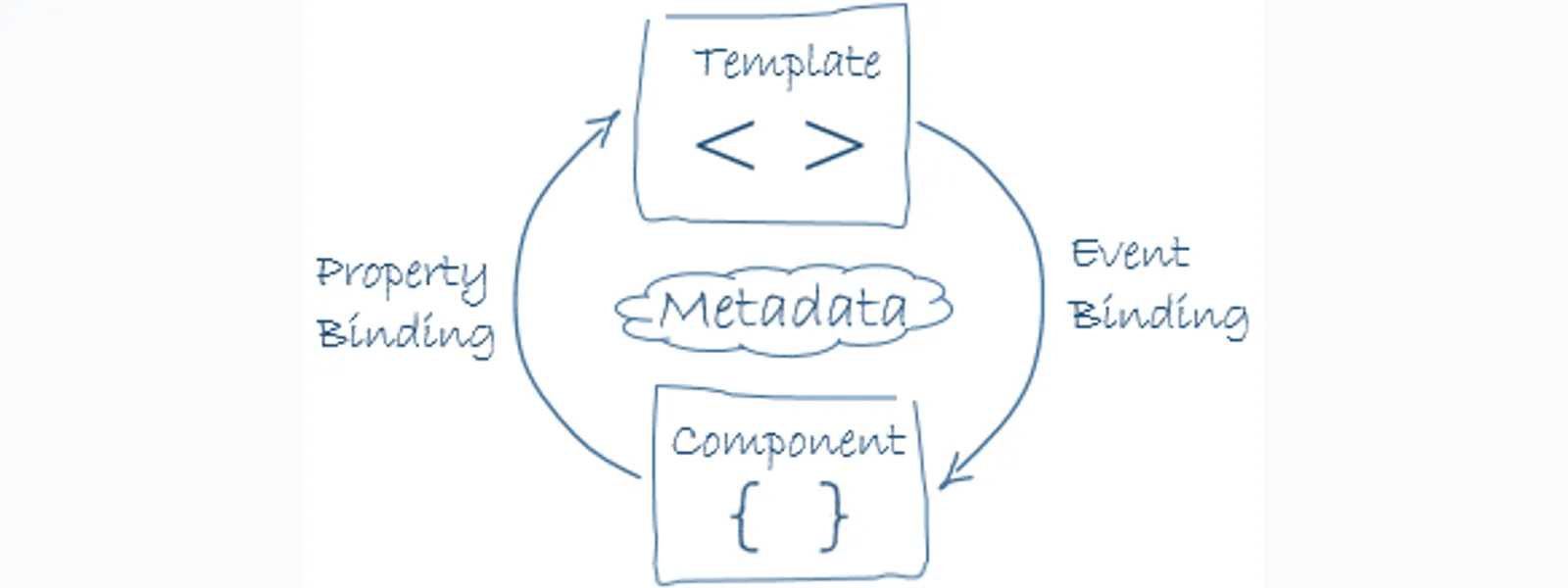
Angular Template Binding Syntax 是讓 template 和 component 溝通的模版語法,常見用法包含插值 `{{...}}`、事件綁定 `(event)`、屬性綁定 `[property]`、雙向綁定 `[(ngModel)]`、結構指令與 template reference variables。這篇整理 Angular 5 學習筆記裡最常用的資料繫結寫法,重點放在每種語法何時使用、資料方向怎麼流動,以及 HTML attribute 和 DOM property 為什麼不能混為一談。
Angular Template Syntax 是什麼?
Angular Template Syntax 是 Angular template 和 component 溝通的語法集合。Template 可以讀取 component 屬性、呼叫 component 方法、接收 DOM 事件,也可以把輸入值傳回 component。
在 Angular 架構中,template 負責描述畫面,component 負責保存狀態與行為。透過模版語法,template 可以與 component 做許多溝通。
對於 `template.html` 來說,所有 HTML 標籤都可以使用,除了 `<script>` 以外。Angular 會忽略 template 裡的 `<script>`,並跳出警告,目的是維護模版安全性,降低 template 被攻擊的風險。
`{{...}}` 插值語法怎麼讀取 component 資料?
`{{...}}` 插值語法會把 component 屬性轉成字串後顯示在畫面。Angular 會取出大括號內的 template expression,並用計算結果替換該位置。
以下是一個插值語法範例:
```html
{{title}}
```
大括號之間的值通常是 component 屬性的名稱。Angular 會使用相應 component 屬性的字串值替換該名稱。
以上面範例來說,Angular 會取元件裡 `title` 和 `heroImageUrl` 的屬性,並取代 `{{title}}` 及 `{{heroImageUrl}}`。頁面上會顯示一個大的應用程式標題,後面接著一個英雄影像。
Template expression 可以做哪些運算?
Template expression 可以做簡單運算與呼叫 component 方法,但不適合放複雜邏輯。會改變 component 狀態的運算符不應放在插值語法裡。
例如在大括號中做運算:
```html
The sum of 1 + 1 is {{1 + 1}}
```
也可以呼叫 component 的 function `getVal()`:
```html
The sum of 1 + 1 is not {{1 + 1 + getVal()}}
```
大多數運算符都可以用在 expression 裡面,除了會影響 component 值的運算符,例如 `=`、`+=`、`-=` 這類寫法。
有時候 `{{...}}` 裡要綁定的數值也可以是在 template 定義的 template reference variable,也就是使用 `#` 符號:
```html
<input #heroInput> {{heroInput.value}}
```
如果 component 裡已經有變數名稱叫做 `hero`,template 裡又有一個 `hero`,template 會優先使用 template 內定義的變數。
Expression 不能引用任何除了 `undefined` 以外的全域變數,例如 `window` 或 `document`;也不能用 `console.log`。Template expression 只能使用 component 內的屬性或方法,或者 template 上下文內的成員。
使用 `{{...}}` 時,有四個原則要注意:
| 原則 | 說明 |
|---|---|
| No visible side effects | 不應該改變任何 component 內的值;在 rendering 整個 expression 時,結果應該是穩定的。 |
| Quick execution | Expression 的運算應該要很快,因為 expression 會在許多狀況下被呼叫;如果裡面有複雜運算,可以考慮用快取增加效能。 |
| Simplicity | 雖然可以在 `{{...}}` 裡寫複雜運算,但不建議;最多放簡單判斷,其他運算建議移到 component 內計算,方便閱讀與開發。 |
| Idempotent | Idempotent 是指相同操作執行第二遍、第三遍時,結果仍和第一遍相同;不管執行幾次,結果都跟只執行一次一樣。 |
`(event)="statement"` 事件綁定怎麼改變 component 狀態?
`(event)="statement"` 是 Angular 的 template statement,主要用來處理事件綁定。事件綁定可以呼叫 component 方法,也可以把 template 上下文中的資料傳回 component。
事件綁定範例:
```html
```
與 `{{...}}` 不同,事件綁定裡的 statement 可以改變 component 的值。被改變的值也能再透過單向綁定 `{{...}}` 顯示在畫面上。
因此,`(event)="statement"` 的 statement 支援 `=` 運算符,但 `+=`、`-=`、`++`、`--` 不被允許。
Statement 上下文也可以引用 template 自己的屬性。以下範例將 template 的 `$event` 物件、template input variable `let hero`,以及 template reference variable `#heroForm` 傳給 component 的事件處理方法:
```html
```
`[target]="expression"` 屬性綁定適合用在哪裡?
`[target]="expression"` 會把 component expression 的結果綁到 DOM property、component property 或 directive property。屬性綁定適合處理布林值、物件、陣列與非字串資料。
以下是一個按鈕停用狀態的範例:
```html
```
當 `isUnchanged` 為 `true` 時,畫面會呈現等同於下列 HTML 的狀態:
```html
```
這種寫法常用在 `disabled`、`src`、`ngClass`、`ngStyle` 或子 component input。重點是:Angular 設定的是 property,不是單純把字串塞進 HTML attribute。
Angular 資料繫結有哪些方向與語法?
Angular 資料繫結可以分成三種方向:資料源到 view、view 到資料源,以及雙向綁定。判斷資料方向後,再選擇插值、屬性綁定、事件綁定或雙向綁定。
| 資料方向 | 語法 | 類型 |
|---|---|---|
| 單向綁定:從資料源到 view | `{{expression}}`<br>`[target]="expression"`<br>`bind-target="expression"` | Interpolation、Property、Attribute、Class、Style |
| 單向綁定:從 view 的目標到資料源 | `(target)="statement"`<br>`on-target="statement"` | Event |
| 雙向綁定 | `[(target)]="expression"`<br>`bindon-target="expression"` | Two-way |
開發時可以先問一句:資料是從 component 顯示到畫面,還是從使用者操作回到 component?答案通常就能決定該用 `[]`、`()`,還是 `[()]`。
HTML attribute 和 DOM property 差在哪裡?
HTML attribute 用來設定元素初始值,DOM property 代表瀏覽器中目前的物件狀態。Angular 插值與屬性綁定通常是在設定 DOM property,不是 HTML attribute。
HTML attribute 和 DOM property 的區別,對理解 Angular 綁定很重要。一旦使用插值 `{{...}}`,就不是使用 HTML attribute,而是在設定 DOM property。
幾種常見關係如下:
| 類型 | 範例 |
|---|---|
| HTML attribute 可以一對一對應 DOM property | `id` |
| HTML attribute 沒有相應 DOM property | `colspan` |
| DOM property 沒有相應 HTML attribute | `textContent` |
| 名稱看似相同但行為不同 | `value`、`disabled` |
HTML attribute 的 `value` 指定初始值;DOM property 的 `value` 屬性是當前值。
例如,瀏覽器執行下面 HTML 時,會建立一個對應的 DOM 節點,並把 `value` 屬性初始化為 `Bob`:
```html
```
當使用者在輸入框中輸入 `Sally` 時,DOM property 的 `value` 變成 `Sally`。但是,HTML attribute 的 `value` 保持不變:
```js
input.getAttribute('value');
// 取得的值仍會返回 "Bob"
```
`disabled` 屬性是另一個特殊例子。按鈕的 `disabled` 屬性預設是 `false`,所以按鈕被啟用。當 HTML 上加入 `disabled` attribute 時,只要 attribute 存在,就會把按鈕的 `disabled` property 初始化為 `true`,因此按鈕會被停用。
也就是說,attribute 的值並不重要,所以不能用下面的語法把按鈕設為 enable:
```html
```
HTML attribute 和 DOM property 並不一樣,即使兩者具有相同名稱,也要先確認 Angular 綁定目標到底是哪一種。
Angular 綁定目標有哪些類型?
Angular 綁定目標包含元素 property、component property、directive property、事件、attribute、class 與 style。遇到沒有 DOM property 的 attribute 時,要改用 `[attr.xxx]`。
| 類型 | 目標 | 例子 |
|---|---|---|
| 屬性 | 元素屬性、component 屬性、directive 屬性 | `<img [src]="heroImageUrl">`<br>`<app-hero-detail [hero]="currentHero"></app-hero-detail>`<br>`<div [ngClass]="{'special': isSpecial}"></div>` |
| 事件 | 元素事件、component 事件、directive 事件 | `<button (click)="onSave()">Save</button>`<br>`<app-hero-detail (deleteRequest)="deleteHero()"></app-hero-detail>`<br>`<div (myClick)="clicked=$event" clickable>click me</div>` |
| 雙向 | 事件和 property | `<input [(ngModel)]="name">` |
| Attribute 例外 | attribute | `<button [attr.aria-label]="help">help</button>` |
| Class | `class` property | `<div [class.special]="isSpecial">Special</div>` |
| Style | `style` property | `<button [style.color]="isSpecial ? 'red' : 'green'">` |
這張表是我在讀 Angular template binding 時最常回頭看的整理:先看左欄判斷綁定類型,再用右欄找對應語法。
Property binding 和 interpolation 要怎麼選?
Property binding 和 interpolation 常常可以達到同樣效果;一般文字顯示可用 interpolation,非字串值、attribute 例外與語意更清楚的 property 設定則用 property binding。
屬性綁定與插值常常能達到相同功效:
```html
is the interpolated image.
is the property bound image.
"{{title}}" is the interpolated title.
"" is the property bound title.
```
一般而言,為了易讀性,可以使用插值 `{{...}}`。但當沒有要綁定的元素 property 時,必須使用屬性綁定的 attribute 形式。
例如:
```html
```
會得到這個錯誤:
```text
Template parse errors:
Can't bind to 'colspan' since it isn't a known native property
```
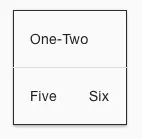
這是因為插值只能設定 properties,不能設定 attributes。這時可以改成 `[attr.colspan]`:
```html
| One-Two | |
| Three-Four | |
| Five | Six |
```
正常顯示會像下面這樣:
Angular 內建 structural directives 有哪些?
Angular 內建 structural directives 會改變 DOM 結構,常見指令包含 `NgIf`、`NgSwitch` 和 `NgForOf`。`NgIf` 不是把元素隱藏,而是從 DOM 中加入或移除元素。
常見的結構指令如下:
| 指令 | 用途 | 範例 |
|---|---|---|
| `NgIf` | 有條件地從 DOM 中添加或刪除一個元素。這和 CSS 的 show、hide 不一樣;當元素被 DOM 移除時,就沒有辦法操作該 DOM 元素裡的物件。 | `<app-hero-detail *ngIf="isActive"></app-hero-detail>` |
| `NgSwitch` | 在一組不同視圖之間切換。 | 見下方範例 |
| `NgForOf` | 為列表中的每個項目重複一個 template。 | `<app-hero-detail *ngFor="let hero of heroes" [hero]="hero"></app-hero-detail>` |
`NgSwitch` 範例:
```html
```
Template reference variables `#var` 怎麼使用?

Template reference variables 使用 `#` 開頭,把 template 中的元素或 directive 匯出成可引用的變數。表單輸入、驗證狀態與事件處理都很常用這種寫法。
在 Angular 裡,可以使用 `#` 開頭,將使用者在網頁上 input 輸入的值轉為 template 變數:
```html
```
這個功能在做表單驗證時很方便:
```html
{{submitMessage}}
```
`#heroForm="ngForm"` 會把 `ngForm` directive 匯出成 `heroForm`,所以 template 後面就能讀取 `heroForm.form.valid` 來決定 submit button 是否可按。
`@Input()` 和 `@Output()` 如何讓外部元件讀取資料?
`@Input()` 讓外部元件把資料傳入目前元件,`@Output()` 讓目前元件用事件把資料傳出去。這是 component 之間資料輸入與事件輸出的基本模式。
要讓 component 內的屬性能夠給其他 component 使用,或者讀取其他 component 的屬性,可以在 `component.ts` 內宣告:
```ts
@Input() hero: Hero;
@Output() deleteRequest = new EventEmitter<Hero>();
```
也可以寫在 `@Component` metadata 裡:
```ts
@Component({
inputs: ['hero'],
outputs: ['deleteRequest'],
})
```
輸入屬性通常接收資料值。輸出屬性會發送事件,例如 `EventEmitter`。
下面的圖顯示 component 屬性的 input 和 output 範例:

Safe navigation operator `?.` 可以解決什麼問題?
Safe navigation operator `?.` 可以避免 template 讀取空值時發生 null reference exception。當左側值為 `null` 或 `undefined` 時,Angular 會直接回傳空白。
為了防止出現 null reference exception,可以使用 `?.`。當值為空值時,template 會直接傳回空白,避免產生不必要的 exception。
以下為範例:
```html
The current hero's name is {{currentHero?.name}}
```
當 `currentHero` 還沒有資料時,`currentHero?.name` 不會讓 template 報錯;等資料載入後,Angular 會再把 `name` 顯示出來。
延伸閱讀
- 建立一個 Angular 5 的專案
- Angular NPM 與 package.json 設定教學
- Angular NgModule 完整解析:模組結構、依賴注入與 forRoot 用法
- Angular Template-Driven Forms 教學:ngModel、驗證與自訂 Validator
- Angular HttpClient 教學:GET、POST、Header、Params 與錯誤處理
常見問題
Angular Template Binding Syntax 最常用的語法有哪些?
Angular Template Binding Syntax 最常用的是 `{{...}}` 插值、`[property]` 屬性綁定、`(event)` 事件綁定和 `[(ngModel)]` 雙向綁定。插值和屬性綁定多半從 component 到畫面,事件綁定則從畫面回到 component。
Angular 插值語法可以呼叫 function 嗎?
Angular 插值語法可以呼叫 component function,例如 `{{getVal()}}`。不過 template expression 會在 change detection 過程中多次執行,所以 function 內容應該保持快速、簡單,而且不要造成 visible side effects。
`[disabled]="isUnchanged"` 和 `disabled="false"` 差在哪裡?
`[disabled]="isUnchanged"` 是把布林值綁到 DOM property,會依照 `isUnchanged` 的 true 或 false 切換按鈕狀態。`disabled="false"` 則仍然存在 `disabled` attribute,瀏覽器會把按鈕視為 disabled。
什麼時候要用 `[attr.colspan]`?
當要綁定的目標是 HTML attribute,而且沒有對應的 DOM property 時,就要用 `[attr.xxx]`。`colspan` 是典型例子,因為 interpolation 只能設定 property,不能直接設定 `colspan` attribute。
Template reference variable 和 component 變數同名時會怎樣?
Template reference variable 和 component 變數同名時,template 會優先使用 template 內定義的變數。為了避免閱讀混亂,實務上建議不要讓 `#var`、`let item` 和 component property 使用同一個名稱。
Safe navigation operator `?.` 適合用在哪些情境?
Safe navigation operator `?.` 適合用在資料可能還沒載入完成的 template,例如 API 回傳前的物件屬性讀取。`currentHero?.name` 可以避免 `currentHero` 還是空值時造成 template exception。
參考資料
最後更新
2017-12-28(本文發布於 2017-12-28,保留 Angular 5 學習筆記內容並補上 GEO 結構。)
關於作者 {#author}
Claire Chang | 企業 AI 導入與流程轉型顧問。專注於 AI Agent 架構設計、ERP 系統整合與企業 AI 治理。
首次發布:2017-12-28