

iOS 6 把畫面旋轉的控制邏輯從 shouldAutorotateToInterfaceOrientation: 換成 supportedInterfaceOrientations 加 shouldAutorotate。單一畫面的 App 改起來不難,但只要專案裡有 TabBarController 或 NavigationController,旋轉方向就不再是「一個 ViewController 決定」這麼單純,而是得一路往下問到目前顯示的子畫面。
單一畫面怎麼設定支援的旋轉方向?
在 ViewController 裡覆寫 supportedInterfaceOrientations 回傳想支援的方向遮罩,再讓 shouldAutorotate 回傳 YES,這個畫面就能依裝置方向旋轉。
//支援Xcode 4.5
- (NSUInteger) supportedInterfaceOrientations {
    //僅正面
    // return UIInterfaceOrientationMaskPortrait;

    //支援縱向(利用 | 設定多參數)
    // return UIInterfaceOrientationMaskPortrait
    //     | UIInterfaceOrientationMaskPortraitUpsideDown;

    //支援橫向
    //UIInterfaceOrientationMaskLandscape:支援按鈕在左、按鈕在右
    // return UIInterfaceOrientationMaskLandscape;

    //支援四個方向
    return UIInterfaceOrientationMaskAll;
}

- (BOOL) shouldAutorotate {
    return YES;
}
UIInterfaceOrientationMaskAll、UIInterfaceOrientationMaskPortrait、UIInterfaceOrientationMaskLandscape 這類遮罩值可以用 | 疊加,所以「支援直向兩種、不支援橫向」這種組合也寫得出來,不必為每種方向各寫一個判斷式。
用了 TabBarController 之後,旋轉方向要怎麼一路往下傳?
一旦畫面架構是 TabBarController 加 NavigationController,最上層的 AppDelegate 並不知道使用者現在停在哪一個分頁、哪一層畫面,所以旋轉方向必須從 AppDelegate 開始,一路詢問到目前真正顯示的那個 ViewController。
設定步驟如下:
-
在 Xcode 專案設定裡勾選要支援的裝置方向(Deployment Info → Device Orientation)。
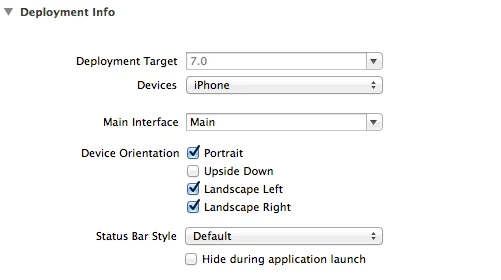
-
在 AppDelegate 加上這段,把詢問對象指向 rootViewController 目前顯示的畫面:
- (NSUInteger)application:(UIApplication *)application supportedInterfaceOrientationsForWindow:(UIWindow *)window
{
    NSUInteger orientations = UIInterfaceOrientationMaskAll;

    if (self.window.rootViewController) {
        UIViewController* presented = [[(UINavigationController *)self.window.rootViewController viewControllers] lastObject];
        orientations = [presented supportedInterfaceOrientations];
    }
    return orientations;
}
- 在 TabBarController 裡把三個方法都轉發給目前選取的分頁(
selectedViewController):
-(BOOL)shouldAutorotateToInterfaceOrientation:(UIInterfaceOrientation)interfaceOrientation {
    return [self.selectedViewController shouldAutorotateToInterfaceOrientation:interfaceOrientation];
}

-(NSUInteger)supportedInterfaceOrientations {
    if (self.selectedViewController)
        return [self.selectedViewController supportedInterfaceOrientations];

    return UIInterfaceOrientationMaskPortrait;
}

-(BOOL)shouldAutorotate {
    return [self.selectedViewController shouldAutorotate];
}
- 對於不支援旋轉的子畫面,固定回傳直向:
- (BOOL)shouldAutorotateToInterfaceOrientation:(UIInterfaceOrientation)interfaceOrientation
{
    return (interfaceOrientation == UIInterfaceOrientationPortrait);
}

- (BOOL)shouldAutorotate
{
    return NO;
}

- (NSUInteger)supportedInterfaceOrientations
{
    return UIInterfaceOrientationMaskPortrait;
}
- 對於要支援旋轉的子畫面,開放到「除了上下顛倒以外的所有方向」:
- (BOOL)shouldAutorotateToInterfaceOrientation:(UIInterfaceOrientation)interfaceOrientation
{
    return YES;
}

- (BOOL)shouldAutorotate
{
    return YES;
}

- (NSInteger)supportedInterfaceOrientations
{
    return UIInterfaceOrientationMaskAllButUpsideDown;
}
這一整條轉發鏈的關鍵在於:每一層容器(AppDelegate、TabBarController)都不自己決定方向,只負責把問題往下傳給真正顯示中的畫面去回答。哪個畫面該轉、哪個不該轉,最終都是最底層那個 ViewController 說了算。
NavigationController 底下的單一畫面要怎麼設定?
如果旋轉方向的差異只發生在 NavigationController 底下的某幾個畫面(沒有 TabBarController),做法類似,但轉發對象換成 visibleViewController:
- (BOOL)shouldAutorotateToInterfaceOrientation:(UIInterfaceOrientation)interfaceOrientation
{
    return [self.visibleViewController shouldAutorotateToInterfaceOrientation:interfaceOrientation];
}

- (BOOL)shouldAutorotate {
    return [self.visibleViewController shouldAutorotate];
}

- (NSUInteger)supportedInterfaceOrientations {
    return [self.visibleViewController supportedInterfaceOrientations];
}
visibleViewController 會回傳目前實際顯示在畫面上的那個 ViewController(也就是 push 到最上層、使用者看得到的那一個),所以旋轉判斷永遠對應到使用者當下所在的畫面,而不是整個 navigation stack。
常見問題
為什麼設定了 supportedInterfaceOrientations 卻沒有效果?
多半是因為 App 架構裡有 TabBarController 或 NavigationController,而容器本身沒有把方法轉發給目前顯示的子畫面。方向設定要一路傳到 AppDelegate、容器、再到子畫面,缺一層就會被容器的預設值蓋掉。
shouldAutorotate 和 supportedInterfaceOrientations 各自負責什麼?
shouldAutorotate 決定這個畫面「要不要」自動旋轉,supportedInterfaceOrientations 決定「可以轉到哪些方向」。兩者要同時回傳正確的值,畫面才會依裝置方向轉動。
只想讓部分畫面支援橫向,其他畫面固定直向,可以嗎?
可以。做法是讓容器(TabBarController/NavigationController)統一把方法轉發給目前顯示的子畫面,再由各子畫面各自回傳自己支援的方向遮罩,如上面的範例所示。
參考資料
Apple Developer Documentation,supportedInterfaceOrientations 屬性說明,存取日期:2026-08-27。https://developer.apple.com/documentation/uikit/uiviewcontroller/1621435-supportedinterfaceorientations
延伸閱讀
- iOS 切換 ViewController 會用到的函數整理:同樣聚焦 Objective-C、iOS,可接著比較不同情境的做法。
- iOS 切換 View 會用到的函數整理:pushViewController 與 presentModalViewController 怎麼選?:同樣聚焦 iOS、Objective-C,可接著比較不同情境的做法。
- iOS 6 與 iOS 7 的不同處整理:同樣聚焦 iOS、Objective-C,可接著比較不同情境的做法。
最後更新
本文最後更新於 2026-08-28。原文發布於 2013-12-11,內容為 iOS 6/7 時期 Objective-C 專案的旋轉方向設定筆記,保留原始程式碼與設定步驟。
關於作者
Claire Chang | 企業 AI 導入與流程轉型顧問。專注於 AI Agent 架構設計、ERP 系統整合與企業 AI 治理。
首次發布:2013-12-11