
這是 Starling Display Objects 系列的第五篇(前面談過 Sprite、Button,這篇轉向會動的物件)。主角是 starling.display.MovieClip 和負責驅動它的 starling.animation.Juggler——兩者搭配起來,才是 Starling 裡動畫真正的播放機制。
Starling 的 MovieClip 和 Flash 原生 MovieClip 差在哪?
Starling MovieClip 表面上做的事跟 Flash 原生 MovieClip 很像(播放一連串影格),但底層邏輯完全不同,差異列出來就知道不能用舊習慣硬套:
- 可個別設 fps:new MovieClip 時就要指定影格速率。Starling 專案的 frameRate 通常拉得很高,但一支動畫用不到那麼多張圖,所以每個 MovieClip 各自有自己的播放速度,不受整體 frameRate 綁死。
- 由一連串連續圖檔組成:素材來源是 TextureAtlas 裡一組命名規則一致的圖片,MovieClip 依序輪播。
- 裡面不能塞子物件:Starling MovieClip 繼承的是
Image,不是DisplayObjectContainer,所以沒有addChild()。實際運作比較像一張大 png 蓋在 Image 上面,靠一個方形遮罩不斷切換顯示區塊。 - 動畫必須交給 Juggler 驅動:所有會動的物件都要實作
IAnimatable介面,動畫效果(包含 Tween、DelayedCall)統一由 Juggler 呼叫advanceTime()推進。 - 沒有 frameLabel:官方沒內建,部分 Starling extension 有自己補上這個功能。
isComplete為 true 時動畫會自動停。
另外兩個實用方法值得記一下:setFrameDuration() 可以單獨調整某一影格的停留時間(影格數從 0 起算),setFrameSound() 則能在播到指定影格時觸發一段音效。連續圖檔本身怎麼產生,可以參考另一篇「產生 TextureAtlas 素材的方式」。
官方 API 文件:https://doc.starling-framework.org/core/starling/display/MovieClip.html
Juggler 是怎麼讓動畫動起來的?
Juggler 本身是一個很單純的 class,作用是集中管理所有實作了 IAnimatable 的物件。你把物件用 add() 丟進去之後,每次 Juggler 的 advanceTime() 被呼叫,它就會逐一呼叫底下每個物件的 advanceTime(),讓動畫往前推進;等某個物件進入 complete 狀態,Juggler 會自動把它踢出管理清單。
Starling 內建一個預設的 Starling.juggler——只要 Starling.current 在跑,每個 frame 就會自動呼叫它的 advanceTime()。一般做法是把遊戲裡大部分動畫都丟進這個預設 juggler;但如果有些動畫要獨立於遊戲主邏輯之外(比如遊戲暫停時仍要播放的畫面),就自己再開一個 Juggler 實例,自行決定每個 frame 什麼時候呼叫它的 advanceTime()。
呼叫的時機要用 EnterFrameEvent.ENTER_FRAME,而不是 Event.ENTER_FRAME——差別在於 EnterFrameEvent 帶了 passedTime(跟上一次事件相隔多久),這個值可以直接餵給 Juggler 的 advanceTime()。用經過時間而不是固定影格數來推進動畫,才不會因為 frame rate 不穩而讓動畫忽快忽慢。
要讓一個物件能被 Juggler 管理,只需要實作 IAnimatable 的 advanceTime() 方法,並且自己設一個判斷條件:達成後把 isComplete 設成 true,Juggler 看到就會自動把它從清單移除。
官方 API:https://doc.starling-framework.org/current/starling/animation/Juggler.html;另一篇中文介紹可參考 http://grayliao.blogspot.tw/2011/11/starling-framework6jugglertweendelaycal.html。
MovieClip 的點擊範圍要怎麼判斷透明區域?
Starling 裡不管是 MovieClip 還是 Button,觸控範圍預設都是矩形(正方形/長方形),不會自動排除透明像素。如果動畫的透明部分不該吃到點擊事件,就得覆寫 hitTest(),回頭用最原始的 BitmapData.hitTest 邏輯去判斷該點是否真的落在不透明區域上。
下面這個範例類別 AlphaMovieClip 繼承 MovieClip,額外存了一份原始 BitmapData,在 hitTest() 裡先算出目前影格對應到大圖裡的座標,再用 getPixel32 取出 alpha 值,alpha 為 0 就直接回傳 null(視為沒點中):
public class AlphaMovieClip extends MovieClip
{
    private var m_TexturePrefix    :String            = "";
    private var m_TextureAtlas     :TextureAtlas      = null;
    private var m_Textures         :Vector.<Texture>  = null;
    private var m_TextureInfo      :Dictionary         = null;
    private var m_BitmapData       :BitmapData         = null;

    public function AlphaMovieClip(texturePrefix:String, textureAtlas:TextureAtlas, bitmapData:BitmapData, fps:Number = 12)
    {
        m_TextureInfo = new Dictionary();

        var names:Vector.<String> = textureAtlas.getNames(texturePrefix);
        for each (var name:String in names)
        {
            var textureInfo:Object = { };
            textureInfo.name = name;
            textureInfo.texture = textureAtlas.getTexture(name);
            m_TextureInfo[name] = textureInfo;
        }

        m_TexturePrefix = texturePrefix;
        m_TextureAtlas = textureAtlas;
        m_Textures = textureAtlas.getTextures(texturePrefix);
        m_BitmapData = bitmapData;

        super(m_Textures, fps);
    }

    override public function hitTest(localPoint:Point, forTouch:Boolean = false):DisplayObject
    {
        if (forTouch && visible && touchable)
        {
            if (getBounds(this).containsPoint(localPoint))
            {
                var texture:Texture = getFrameTexture(currentFrame);
                var subtexture:SubTexture = texture as SubTexture;
                var textureFrame:Rectangle = subtexture.frame;
                var clipping:Rectangle = subtexture.clipping;
                var frameBound:Rectangle = new Rectangle(
                    Math.abs(textureFrame.x),
                    Math.abs(textureFrame.y),
                    clipping.width * m_TextureAtlas.texture.width,
                    clipping.height * m_TextureAtlas.texture.height
                );
                clipping.x *= m_TextureAtlas.texture.width;
                clipping.y *= m_TextureAtlas.texture.height;

                var final_x:uint = (frameBound.containsPoint(localPoint) ? localPoint.x - frameBound.x : uint.MAX_VALUE);
                var final_y:uint = (frameBound.containsPoint(localPoint) ? localPoint.y - frameBound.y : uint.MAX_VALUE);

                if (final_x != uint.MAX_VALUE && final_y != uint.MAX_VALUE)
                {
                    var pixel:uint = m_BitmapData.getPixel32(clipping.x + final_x, clipping.y + final_y);
                    if (uint((pixel >> 24) & 0xFF) == 0)
                    {
                        return null;
                    }
                }
                else
                {
                    return null;
                }
            }
        }
        return super.hitTest(localPoint, forTouch);
    }
}
這個做法的完整討論原本發表在 Starling 官方論壇。
一個完整的 MovieClip 範例長什麼樣子?
下面用一組跑步動畫的 TextureAtlas 示範完整流程:讀圖、建 atlas、建 MovieClip、丟進 Juggler、用觸控事件控制暫停/播放。
StarlingTest.as(進入點,啟動 Starling):
package
{
    import flash.display.Sprite;
    import starling.core.Starling;

    [SWF(frameRate="60",Width="800",Height="600")]
    public class StarlingTest extends Sprite
    {
        public function StarlingTest()
        {
            var star:Starling = new Starling(Main, stage);
            star.start();
        }
    }
}
Main.as(建立 TextureAtlas,產生兩個 MovieClip,一個用自訂的 AlphaMovieClip,一個用原生 MovieClip 對照):
package {
    import flash.display.Bitmap;
    import starling.core.Starling;
    import starling.display.MovieClip;
    import starling.display.Sprite;
    import starling.events.Touch;
    import starling.events.TouchEvent;
    import starling.events.TouchPhase;
    import starling.textures.Texture;
    import starling.textures.TextureAtlas;

    public class Main extends Sprite {
        [Embed(source = 'test.xml', mimeType = 'application/octet-stream')]
        private var AtlasXML:Class;

        [Embed(source = 'test.png')]
        private var AtlasTexture:Class;

        private var mc:AlphaMovieClip;

        public function Main() {
            var bitmap:Bitmap = new AtlasTexture();
            var texture:Texture = Texture.fromBitmap(bitmap);
            var xml:XML = XML(new AtlasXML());
            var atlas:TextureAtlas = new TextureAtlas(texture, xml);

            mc = new AlphaMovieClip("run", atlas, bitmap.bitmapData, 30);
            var m2:MovieClip = new MovieClip(atlas.getTextures("run"), 30);
            m2.loop = false;
            m2.x = 200;
            mc.addEventListener(TouchEvent.TOUCH, touchEventHandler);
            addChild(mc);
            addChild(m2);

            Starling.juggler.add(mc);
            Starling.juggler.add(m2);
        }

        private function touchEventHandler(event:TouchEvent):void {
            var touch:Touch = event.getTouch(this);
            if (!touch) return;
            if (touch.phase == TouchPhase.BEGAN) {
                mc.pause();
            } else if (touch.phase == TouchPhase.ENDED) {
                mc.play();
            }
        }
    }
}
素材是一張 12 格跑步動作的 TextureAtlas(test.png),對應的 test.xml 定義每一格在大圖裡的座標:
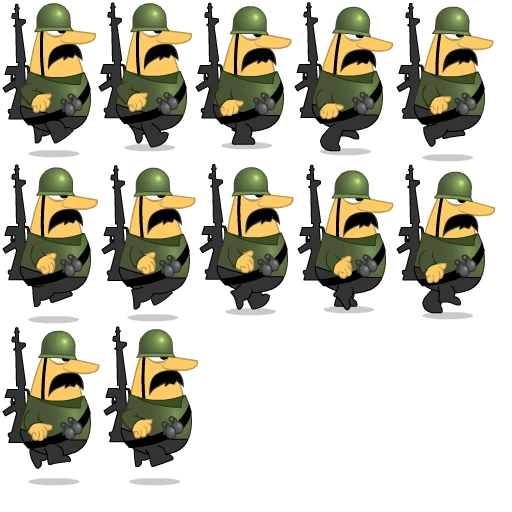
<?xml version="1.0" encoding="UTF-8"?>
<textureAtlas imagePath="test.png">
    <subTexture name="run0001" x="2" y="2" width="94" height="156" frameX="0" frameY="-4" frameWidth="100" frameHeight="160"/>
    <subTexture name="run0002" x="98" y="2" width="94" height="150" frameX="0" frameY="-10" frameWidth="100" frameHeight="160"/>
    <subTexture name="run0003" x="194" y="2" width="98" height="148" frameX="-1" frameY="-12" frameWidth="100" frameHeight="160"/>
    <subTexture name="run0004" x="294" y="2" width="100" height="154" frameX="0" frameY="-6" frameWidth="100" frameHeight="160"/>
    <subTexture name="run0005" x="396" y="2" width="98" height="160" frameX="0" frameY="0" frameWidth="100" frameHeight="160"/>
    <subTexture name="run0006" x="2" y="164" width="96" height="160" frameX="0" frameY="0" frameWidth="100" frameHeight="160"/>
    <subTexture name="run0007" x="100" y="164" width="96" height="158" frameX="-1" frameY="-2" frameWidth="100" frameHeight="160"/>
    <subTexture name="run0008" x="198" y="164" width="96" height="152" frameX="-1" frameY="-8" frameWidth="100" frameHeight="160"/>
    <subTexture name="run0009" x="296" y="164" width="98" height="150" frameX="-1" frameY="-10" frameWidth="100" frameHeight="160"/>
    <subTexture name="run0010" x="396" y="164" width="100" height="156" frameX="0" frameY="-4" frameWidth="100" frameHeight="160"/>
    <subTexture name="run0011" x="2" y="326" width="98" height="160" frameX="0" frameY="0" frameWidth="100" frameHeight="160"/>
    <subTexture name="run0012" x="102" y="326" width="96" height="160" frameX="-1" frameY="0" frameWidth="100" frameHeight="160"/>
</textureAtlas>
常見問題
Starling MovieClip 可以塞子物件嗎?
不行。它繼承 Image 而非 DisplayObjectContainer,沒有 addChild()。要做群組動畫,得靠外層的 Sprite 容器把多個 MovieClip 組在一起,而不是往 MovieClip 裡塞東西。
為什麼動畫要用 EnterFrameEvent 而不是 Event.ENTER_FRAME?
因為只有 EnterFrameEvent 帶 passedTime。把這個值傳給 Juggler 的 advanceTime(),動畫播放速度才會跟真實經過時間掛勾,不受 frame rate 波動影響。
一個 Juggler 可以管多個動畫嗎?
可以,也建議這樣做。Starling.juggler 本身就是設計來同時管理任意數量的 IAnimatable 物件;需要獨立生命週期的動畫(例如暫停選單的特效)再另外開一個 Juggler 實例分開管理。
想要動畫命中判斷排除透明區域,一定要自己寫 hitTest 嗎?
如果用原生 MovieClip,是的,需要覆寫 hitTest() 並比對 BitmapData 的 alpha 值。上面範例的 AlphaMovieClip 就是這個做法;社群論壇上也有現成版本可以直接參考、修改。
參考資料
- Starling Framework, MovieClip API:https://doc.starling-framework.org/core/starling/display/MovieClip.html
- Starling Framework, Juggler API:https://doc.starling-framework.org/current/starling/animation/Juggler.html
- Juggler / Tween / DelayedCall 介紹:http://grayliao.blogspot.tw/2011/11/starling-framework6jugglertweendelaycal.html
延伸閱讀
- Starling Display Objects 介紹:Starling 啟動、物件樹與 Stage:同樣聚焦 Starling、ActionScript,可接著比較不同情境的做法。
- Starling Display Objects:Button 與 Sprite 實作重點:同樣聚焦 Starling、ActionScript,可接著比較不同情境的做法。
- Starling Framework簡介:同樣聚焦 ActionScript、Starling,可接著比較不同情境的做法。
最後更新
2026-08-28
關於作者
Claire Chang | 企業 AI 導入與流程轉型顧問。專注於 AI Agent 架構設計、ERP 系統整合與企業 AI 治理。
首次發布:2014-02-11