
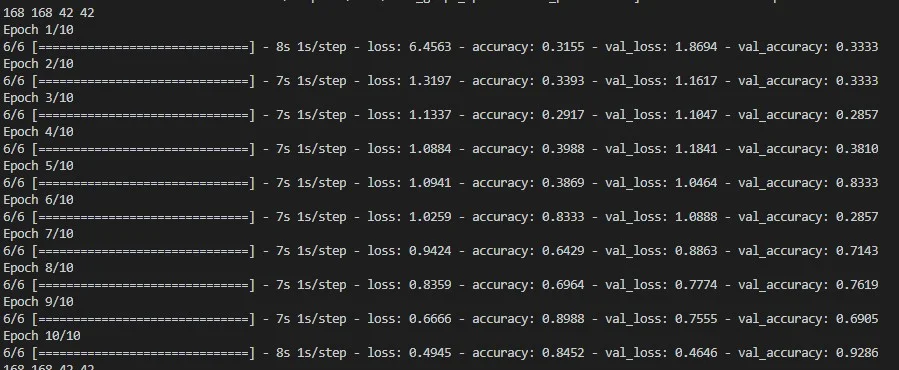
使用 GPU 跑 TensorFlow 時,最常見的問題不是模型程式本身,而是 TensorFlow、CUDA、ptxas 與系統 DLL 版本沒有對齊。這篇用 Fashion MNIST 的簡單訓練程式當基準,整理我實際遇到的錯誤訊息、處理方向與成功偵測 GPU 的訊息。
如何準備一個最小 TensorFlow GPU 測試程式?
TensorFlow GPU 除錯應先從最小可重現範例開始。Fashion MNIST 分類模型足夠簡單,可以快速判斷環境是否能正常訓練。
我使用 TensorFlow 官方 Keras classification 教學作為測試起點(TensorFlow,官方教學)。核心流程是載入 Fashion MNIST、建立 `Sequential` 模型、轉成 `tf.data.Dataset`,再執行 5 個 epochs。
```python
import tensorflow as tf
import numpy as np
import matplotlib.pyplot as plt
import time
print(tf.version)
fashion_mnist = tf.keras.datasets.fashion_mnist
(train_images, train_labels), (test_images, test_labels) = fashion_mnist.load_data()
model = tf.keras.Sequential([
tf.keras.layers.Flatten(input_shape=(28, 28)),
tf.keras.layers.Dense(128, activation='relu'),
tf.keras.layers.Dense(10)
])
train_images_tensor = tf.convert_to_tensor(train_images, dtype=tf.float32)
train_labels_tensor = tf.convert_to_tensor(train_labels, dtype=tf.int64)
train_ds = tf.data.Dataset.from_tensor_slices((train_images_tensor, train_labels_tensor))
def configure_for_performance(ds):
ds = ds.cache()
ds = ds.shuffle(buffer_size=1000)
ds = ds.batch(32)
ds = ds.prefetch(buffer_size=tf.data.AUTOTUNE)
return ds
train_ds = configure_for_performance(train_ds)
model.compile(
optimizer='adam',
loss=tf.keras.losses.SparseCategoricalCrossentropy(from_logits=True),
metrics=['accuracy']
)
print(time.strftime("%Y-%m-%d_%H-%M-%S"))
model.fit(train_ds, epochs=5, batch_size=32)
print(time.strftime("%Y-%m-%d_%H-%M-%S"))
test_loss, test_acc = model.evaluate(test_images, test_labels, verbose=2)
print('\nTest accuracy:', test_acc)
```
先用固定範例測環境,比一邊寫模型一邊猜 GPU 問題穩定很多。
TensorFlow 版本過舊會出現什麼錯誤?
TensorFlow 版本過舊時,可能會遇到 dispatch 模組屬性不存在的錯誤。這類錯誤通常要先升級 TensorFlow,而不是改模型程式。
我遇到的錯誤是:
```text
AttributeError: module 'tensorflow.python.util.dispatch' has no attribute 'add_fallback_dispatch_list'
```
處理方向是升級 TensorFlow:
```bash
pip install --upgrade tensorflow
```
GPU 版本則可升級 `tensorflow-gpu`:
```bash
pip install --upgrade tensorflow-gpu
```
不過 TensorFlow 後續版本的 GPU 安裝方式曾經調整,實際專案應以 TensorFlow 官方安裝文件為準。這裡的套件名稱可以保留作為除錯線索,但不要當成所有版本都適用的唯一答案。
CUDA ptxas 版本過舊會造成什麼警告?
CUDA ptxas 版本過舊時,TensorFlow 可能警告 XLA 程式碼有錯誤編譯風險。這代表環境可執行,但結果或穩定性可能不可靠。
我遇到的警告訊息如下:
```text
WARNING * You are using ptxas 11.0.194, which is older than 11.1.
ptxas before 11.1 is known to miscompile XLA code, leading to incorrect results or invalid-address errors.
```
這個警告指出正在使用舊版 `ptxas` 編譯器。處理方向是升級到相容的 CUDA Toolkit,或依 TensorFlow 訊息選擇性更新 ptxas binary。
可參考 NVIDIA CUDA Toolkit 官方頁面:https://developer.nvidia.com/cuda-toolkit。
zlibwapi.dll 找不到要怎麼處理?
Windows 環境跑 TensorFlow GPU 時,如果找不到 zlibwapi.dll,通常代表 zlib 動態函式庫沒有被放在可搜尋路徑。
我遇到的錯誤是:
```text
Could not locate zlibwapi.dll. Please make sure it is in your library path!
```
處理方向是安裝或補上 zlib library,並讓系統能在 PATH 或指定目錄找到 `zlibwapi.dll`。通常可以把檔案放在 `C:\Windows\System32`,但正式環境更建議用明確的環境變數與安裝紀錄管理。
zlib 官方網站是 https://www.zlib.net/。
zlibwapi.dll 版本錯誤代表什麼?
zlibwapi.dll 錯誤碼 193 通常和 32 位元、64 位元架構不匹配有關。TensorFlow、Python、作業系統與 DLL 架構必須一致。
錯誤訊息是:
```text
Could not load library zlibwapi.dll. Error code 193.
Please verify that the library is built correctly for your processor architecture (32-bit, 64-bit)
```
我最後改下載 x64 版本的 zlib 後解決。這是一個很典型的 GPU 環境除錯經驗:錯誤訊息看起來像缺檔,但真正問題可能是架構版本不相容。
成功使用 GPU 跑 TensorFlow 會看到什麼?
TensorFlow 成功建立 GPU device 時,log 會顯示 GPU 名稱、記憶體與 compute capability。這是確認模型真的跑到 GPU 的第一個訊號。
我看到的成功訊息如下:
```text
Created device /job:localhost/replica:0/task:0/device:GPU:0 with 3971 MB memory:
device: 0, name: NVIDIA GeForce GTX 1660 Ti, pci bus id: 0000:01:00.0, compute capability: 7.5
```
看到這段 log 後,仍建議觀察 GPU 使用率、訓練時間與溫度。TensorFlow 偵測到 GPU 不代表資料管線已經最佳化,也不代表每個 operation 都會放到 GPU。
常見問題
TensorFlow GPU 除錯第一步要做什麼?
先跑官方或最小範例,不要直接用大型專案測試。Fashion MNIST 這類簡單模型可以快速判斷 TensorFlow、CUDA 與 GPU 是否能正常配合。
`add_fallback_dispatch_list` 錯誤怎麼處理?
這通常和 TensorFlow 版本過舊或套件不相容有關。先檢查 TensorFlow 版本,再依官方文件升級到和 Python、CUDA 相容的版本。
ptxas 版本過舊一定要處理嗎?
如果 TensorFlow 明確警告舊版 ptxas 可能造成 XLA 錯誤編譯,就應該處理。最穩定的方式是使用 TensorFlow 官方建議的 CUDA 與 cuDNN 組合。
zlibwapi.dll 可以隨便下載放進系統嗎?
不建議隨便下載未知來源 DLL。應使用可信來源,並確認 32 位元或 64 位元版本和系統、Python、TensorFlow 架構一致。
如何知道 TensorFlow 真的使用 GPU?
可以看 TensorFlow 啟動 log 是否建立 `device:GPU:0`,也可以用 GPU 監控工具觀察訓練時的使用率。
參考資料
- TensorFlow,〈Basic classification: Classify images of clothing〉。
- NVIDIA,〈CUDA Toolkit〉。
- zlib,〈zlib Home Site〉。
最後更新
2026-08-27
延伸閱讀
關於作者 {#author}
Claire Chang | 企業 AI 導入與流程轉型顧問。專注於 AI Agent 架構設計、ERP 系統整合與企業 AI 治理。
首次發布:2023-01-03