

這篇是我在 Windows 環境安裝 TensorFlow 2 Object Detection API 的完整記錄:包含相關教學資源整理、protobuf 工具的安裝、用 conda 建立 Python 3.7 環境解決 `opencv-python` wheel 建置失敗的問題,以及 DLL 載入錯誤、setup.cfg 棄用警告等常見錯誤的排解方式。
安裝前有哪些教學資源可以參考?
- 中文官網教學: TensorFlow Hub 目标检测 Colab
- Colab 頁面: TensorFlow Hub 目标检测 Colab
- 官方 GitHub 的說明文件: TensorFlow 2 Detection Model Zoo
- 官方 GitHub Model 下載: Model Garden for TensorFlow
- 大神的使用分享: Day 16:TensorFlow 2 Object Detection API 安裝
怎麼在 Python 安裝 object_detection?
我是在 Windows 的環境做開發,而官網教學的環境是 Linux,所以相關工具的安裝花了些時間,在這邊分享一下我的安裝方式。
以下為 Linux 環境的工具安裝指令:
```bash
sudo apt install -y protobuf-compiler
cd models/research/
protoc object_detection/protos/*.proto --python_out=.
cp object_detection/packages/tf2/setup.py .
python -m pip install .
```
大概就是要安裝 protobuf,接著下載 TensorFlow Models,然後把 model 放到要呼叫 Object Detection 的程式目錄下方。不過我在執行 `python -m pip install .` 時,一直出現如下錯誤:
ERROR: Could not build wheels for opencv-python, which is required to install pyproject.toml-based projects
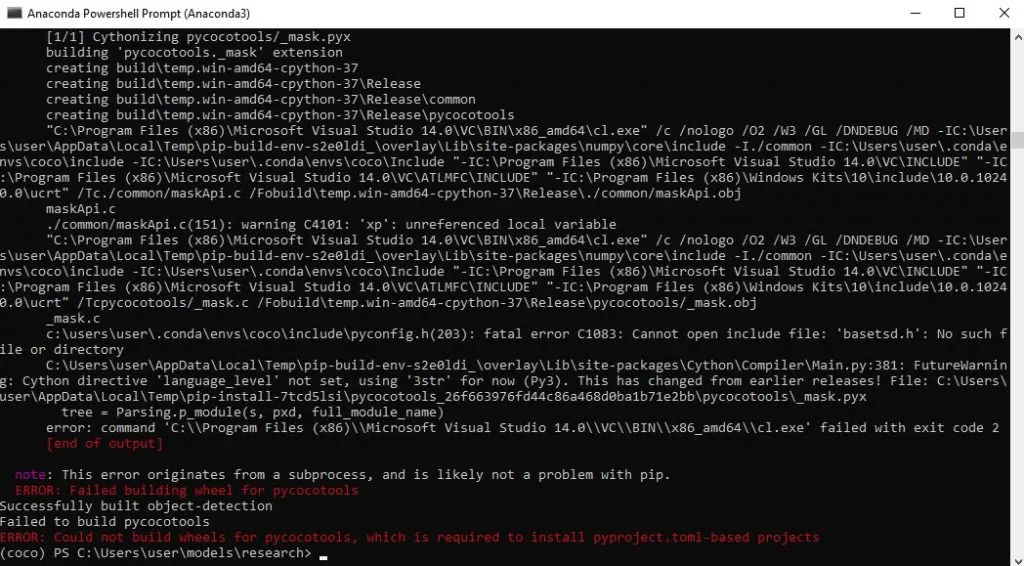
查了一些網路文章後,大概猜到是 Python 版本和 OpenCV 版本還有 TensorFlow 版本不合。於是到官方網站看一下安裝所需要的環境需求,不同版本的 TensorFlow 所要搭配的 OpenCV、Python 版本都不同:
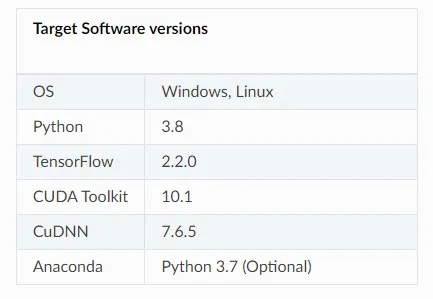
最後我是使用 Python 3.7 的環境,才成功安裝好 object_detection:
```bash
conda create -n object_detection python=3.7.16
conda activate object_detection
cd models/research/
python -m pip install .
```
怎麼在 Windows 安裝 protobuf 工具?
在 Windows 上,可以透過以下步驟安裝 protobuf 編譯器:
- 下載安裝包:訪問 protobuf 的 GitHub Release 頁面,找到適用於 Windows 的預編譯二進位檔(例如 protoc-3.x.x-win64.zip)並下載到本地。
- 解壓縮檔案:將下載的 zip 解壓縮到想要安裝的位置,例如 `C:\protobuf` 資料夾。
- 設置環境變數:將解壓縮後的 `bin` 資料夾路徑加到系統環境變數中,這樣系統就能在任意位置找到 protoc 命令。
- 驗證安裝:打開命令提示字元,執行 `protoc --version`,確認 protoc 成功安裝。
安裝完成之後,就可以在 `./models/research` 下面執行:
```bash
protoc object_detection/protos/*.proto --python_out=.
```
接著用下面指令進行測試:
```bash
python object_detection/builders/model_builder_tf2_test.py
```
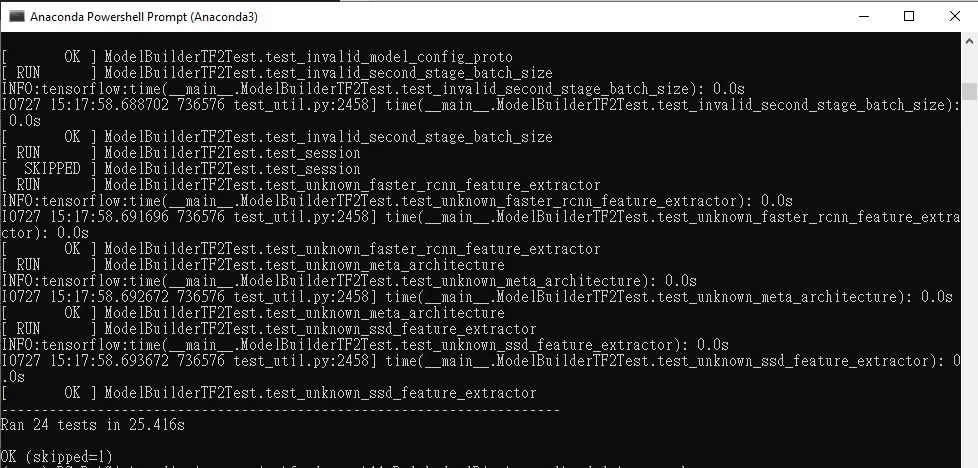
如果沒有把 `*.proto` 編譯成 `.py`,在執行物件偵測的程式碼時會出現以下錯誤:
from object_detection.protos import string_int_label_map_pb2
>
ImportError: cannot import name 'string_int_label_map_pb2'
其他遇到的錯誤該怎麼解?
DLL 載入錯誤
import _ssl # if we can't import it, let the error propagate
>
ImportError: DLL load failed: The specified module could not be found.
討論串: Python 3.7 anaconda environment - import _ssl DLL load fail error
解法:從 `anaconda3\Library\bin` copy 以下檔案並 paste 到 `anaconda3/DLLs`。
setup.cfg 指令過期錯誤
site-packages\setuptools\config\setupcfg.py:293: _DeprecatedConfig: Deprecated config in `setup.cfg`
或
AttributeError: module 'os' has no attribute 'add_dll_directory'
解法:Python 環境和套件之間版本不合,重新檢查套件版本是否符合官網要求。以下為我最終使用的環境的套件版本清單(spec)。
延伸閱讀
- TensorFlow 和 Keras 版本不相容錯誤:cannot import name 'dtensor' 解法:同樣聚焦 TensorFlow、Python,可接著比較不同情境的做法。
- 在 Python 使用 GPU:安裝正確 TensorFlow、PyTorch 與 CuPy 套件:同樣聚焦 Python、TensorFlow,可接著比較不同情境的做法。
- TensorFlow Object Detection API 功能介紹與模型選擇:同樣聚焦 TensorFlow,可接著比較不同情境的做法。
常見問題
為什麼安裝 object_detection 時 opencv-python 建置失敗?
通常是 Python、OpenCV、TensorFlow 三者版本不相容,pip 嘗試從原始碼建置 opencv-python wheel 時失敗。解法是照官網的版本需求表,用 conda 建立對應版本(例如 Python 3.7)的虛擬環境再安裝。
為什麼需要安裝 protobuf 編譯器?
Object Detection API 的 protos 目錄下有許多 `.proto` 定義檔,必須先用 protoc 編譯成 `_pb2.py`,Python 才能匯入。沒編譯的話會出現 `ImportError: cannot import name 'string_int_label_map_pb2'`。
Windows 上 protoc 要怎麼安裝?
到 protobuf 的 GitHub Releases 下載 protoc-3.x.x-win64.zip,解壓縮後把 `bin` 資料夾加入環境變數 PATH,再用 `protoc --version` 驗證即可。
遇到 ImportError: DLL load failed 怎麼辦?
這在 Anaconda 的 Python 3.7 環境常見,把 `anaconda3\Library\bin` 下的相關 DLL 檔案複製到 `anaconda3/DLLs` 資料夾即可解決。
參考資料
- TensorFlow 2 Detection Model Zoo
- TensorFlow Object Detection API 官方安裝教學
- Python 3.7 Anaconda DLL load fail 討論串
最後更新
2026-08-28(原文發布於 2023-07-27,本文保留原始筆記內容並補上 GEO 結構。)
關於作者 {#author}
Claire Chang | 企業 AI 導入與流程轉型顧問。專注於 AI Agent 架構設計、ERP 系統整合與企業 AI 治理。
首次發布:2023-07-27