
在打造 RAG 應用時,第一步就是把各種格式的資料餵給 LlamaIndex:PDF、YouTube 字幕、圖片都可能是知識來源。這篇文章整理我在實作時用到的載入方式,包括舊版 `download_loader` 的寫法、官方現在推薦的 `SimpleDirectoryReader`,以及針對特殊格式要怎麼掛上自訂的 Reader。
LlamaIndex 的教學資料在哪裡?
我在研究 LlamaIndex 的文件載入時,主要參考了這兩個資源:
- 官方課程 repo,裡面有許多簡單範例:LlamaIndex-course
- 載入文件的範例:Data_Connectors.ipynb(原 LlamaIndex course 範例已下架)
怎麼用 LlamaIndex 載入 PDF 與 YouTube 字幕?
範例程式載入 PDF 的寫法如下:
```python
from pathlib import Path
from llama_index.core import download_loader
PDFReader = download_loader("PDFReader")
loader = PDFReader()
pdf_document = loader.load_data(file=Path('./sample.pdf'))
```
載入 YouTube 字幕的範例如下:
```python
from llama_index.core import download_loader
YoutubeTranscriptReader = download_loader("YoutubeTranscriptReader")
loader = YoutubeTranscriptReader()
youtube_documents = loader.load_data(ytlinks=['https://www.youtube.com/watch?v=nHcbHdgVUJg&ab_channel=WintWealth'])
```
使用上面的寫法,我們會發現會跳出這樣的警告:
DeprecationWarning: Call to deprecated function (or staticmethod) download_loader. (`download_loader()` is deprecated. Please install tool using pip install directly instead.) PDFReader = download_loader("PDFReader")
>
— 錯誤警告訊息
新的文件讀取方式是什麼?
現在官方推薦的檔案讀取方式如下:
```python
from llama_index.core import SimpleDirectoryReader
documents = SimpleDirectoryReader("./files").load_data()
```
不過,如果我們需要這個 Reader 使用特別的解析器去解析特別格式的文件的話,則要使用額外相關的函式庫,如下面的介紹。
哪裡可以找到相關的函式庫?
當我們查詢載入本地端檔案的 API 時,可以在這個頁面看到許多 Reader 的介紹:LlamaIndex Readers API。
但是如果直接在 `llama_index.core` 會找不到裡面許多的函數,這時候可以在 LlamaHub 找到,這邊可以找到許多其他開發者開發的好用函式庫。
怎麼讀取各式文件(以圖片描述為例)?
首先先安裝所需的套件:
```bash
pip install llama-index-readers-file
```
Reader 頁面中許多各式各樣的 Reader 則請參考此文件:llama-index-readers-file。
使用範例如下,下面這樣我們就可以用 `doc.text` 去取得圖片的文字描述:
```python
from llama_index.core import SimpleDirectoryReader
from llama_index.readers.file import ImageCaptionReader
parser = ImageCaptionReader()
file_extractor = {
".jpg": parser,
".jpeg": parser,
".png": parser,
} # Add other image formats as needed
documents = SimpleDirectoryReader(
"./data", file_extractor=file_extractor
).load_data()
for index, doc in enumerate(documents):
print(doc.text)
```
為什麼圖片 Reader 需要 GPU 版 Pytorch?
要注意的是,當我們使用圖片閱讀器時,事實上它會載入 Hugging Face 的一些 transformers 模型去做圖片辨識,有一些模型只能使用 GPU,所以我們一定要記得我們的 Pytorch 要使用 GPU 版本的。
參考此文件:Pytorch 官方安裝指引。
在執行 ImageCaptionReader 時,可以從終端機輸出看到它確實載入了 Hugging Face 的 transformers 模型:
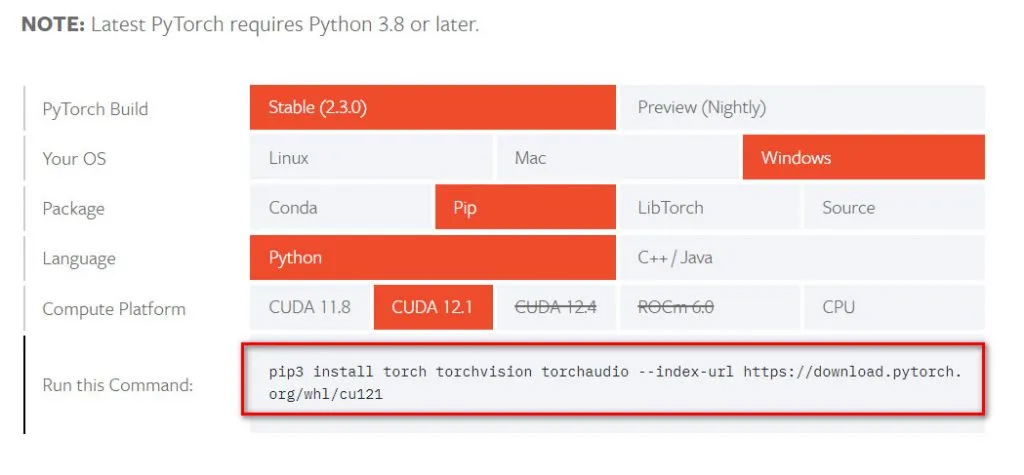
如果已經安裝了 CPU 版本的,記得先把 torch 反安裝後再重新安裝 GPU 版本。
延伸閱讀
- LlamaIndex 載入多種類文件教學:PDF、YouTube 字幕與圖片 Reader 完整用法:同樣聚焦 LlamaIndex、RAG,可接著比較不同情境的做法。
- LlamaIndex 介紹:用 Python 建立 RAG 索引與查詢流程:同樣聚焦 LlamaIndex、RAG,可接著比較不同情境的做法。
- 使用 LlamaIndex 載入文檔:YouTube 字幕、PDF 與 Notion 一次搞定:同樣聚焦 LlamaIndex、RAG,可接著比較不同情境的做法。
常見問題
LlamaIndex 的 download_loader 為什麼被棄用了?
因為舊版的 `download_loader` 會在執行期動態下載 Reader 程式碼,官方現在改為推薦直接用 pip 安裝對應的套件,例如 `llama-index-readers-file`,再從 `llama_index.readers.file` 匯入。
載入整個資料夾的混合格式檔案該用什麼方法?
使用 `SimpleDirectoryReader("./files").load_data()`,它會自動依照副檔名選擇對應的解析器。若某種格式需要特殊處理,可以透過 `file_extractor` 參數傳入自訂 Reader。
用 ImageCaptionReader 讀圖片要注意什麼?
它背後會載入 Hugging Face 的 transformers 模型做圖片辨識,部分模型只支援 GPU,因此必須安裝 GPU 版本的 Pytorch;若裝了 CPU 版,要先移除 torch 再重裝 GPU 版。
哪裡可以找到社群開發的各種 Reader?
可以到 LlamaHub 查詢,那裡收錄了許多開發者貢獻的 Reader 函式庫,涵蓋各種檔案格式與資料來源。
參考資料
- LlamaIndex-course(GitHub)
- Data Connectors 範例 Notebook(原連結已失效,範例已下架)
- LlamaIndex Readers API 文件
- LlamaHub Readers
- Pytorch 安裝指引
最後更新
2026-08-28(原文發布於 2024-05-24,本文保留原始筆記內容並補上 GEO 結構。)
關於作者 {#author}
Claire Chang | 企業 AI 導入與流程轉型顧問。專注於 AI Agent 架構設計、ERP 系統整合與企業 AI 治理。
首次發布:2024-05-24