
拆分相黏的正方形,可以用 OpenCV 的 `distanceTransform()` 找出每個物件的核心區域,再用 `connectedComponents()` 建立標記,最後交給 `watershed()` 從標記向外分割。這個流程適合前景清楚、物件有可辨識中心,但邊界互相接觸的影像。
為什麼相黏正方形難以用輪廓直接分開?
相黏正方形在二值圖上常會被視為同一個連通區域。`findContours()` 只能抓到外輪廓時,OpenCV 會把兩個正方形當成一個物件。

純 OpenCV 圖像辨識常要先抓色塊、找輪廓,再判斷形狀。當目標邊界因為模糊、遮擋或相黏而消失時,單純依賴外輪廓就會失效。
這類問題在實務上很常見,例如手遮住臉、物件互相接觸、零件堆疊或卡片重疊。核心挑戰是:畫面裡有兩個物件,但二值化後只剩一個連續區塊。
distanceTransform 在這個流程中做什麼?
`cv2.distanceTransform()` 會計算每個前景像素到最近背景像素的距離。距離越大的位置,越可能是物件的中心核心。
```py
import cv2
import numpy as np
img = cv2.imread("image.jpg", 0)
ret, thresh = cv2.threshold(img, 127, 255, 0)
dist_transform = cv2.distanceTransform(thresh, cv2.DIST_L2, 5)
```
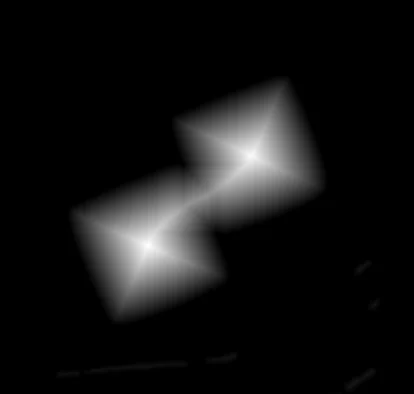
OpenCV 的 distance transform 支援多種距離計算方式,例如 `cv2.DIST_L1`、`cv2.DIST_L2` 和 `cv2.DIST_C`。我使用 L2 距離,適合取得比較接近歐幾里德距離的中心區域。
threshold 如何找出兩個正方形的核心?
threshold 會從 distance transform 結果中留下高距離區域。若閾值設定得當,相黏的兩個正方形會出現兩塊分離的前景核心。
```py
ret, sure_fg = cv2.threshold(
dist_transform,
0.9 * dist_transform.max(),
255,
0,
)
```
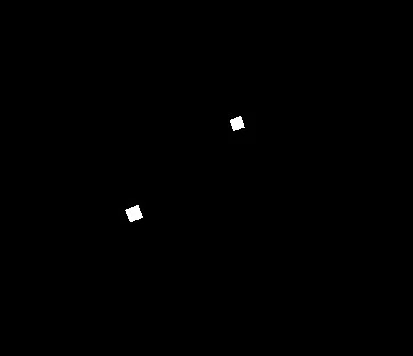
我使用 `0.9 * dist_transform.max()` 當閾值,目的是讓兩個正方形中間不要相連。這個數值不是固定答案;若物件形狀、大小或接觸程度不同,可能要改成 0.7、0.8 或其他比例。
connectedComponents 如何建立 watershed 標記?
`cv2.connectedComponents()` 會把二值圖中的每個連通區域標上不同編號。watershed 需要這些標記作為分割起點。
```py
num_labels, markers = cv2.connectedComponents(binary_image)
```
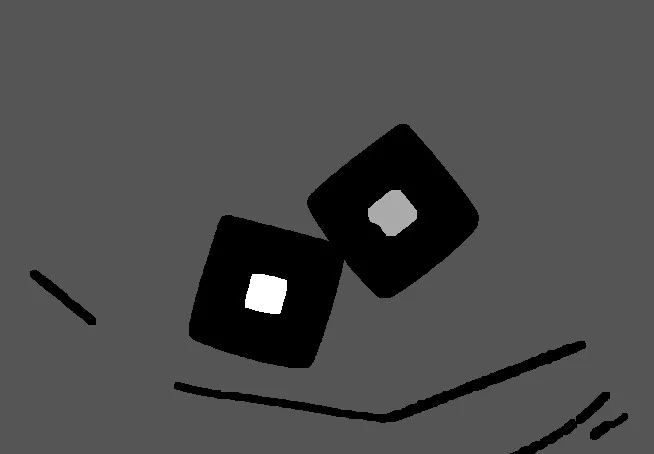
`scipy.ndimage.label()` 和 `cv2.connectedComponents()` 都能做連通區域標記,但返回值與參數習慣不同。若整個專案已經使用 OpenCV,直接用 `cv2.connectedComponents()` 可以減少相依套件。
watershed 如何完成分割?
`cv2.watershed()` 會依照標記與影像梯度,把未知區域分配到不同物件。watershed 執行後,邊界像素通常會被標記為 `-1`。
```py
markers = cv2.watershed(cv2.cvtColor(img, cv2.COLOR_GRAY2BGR), markers)
img[markers == -1] = 0
```
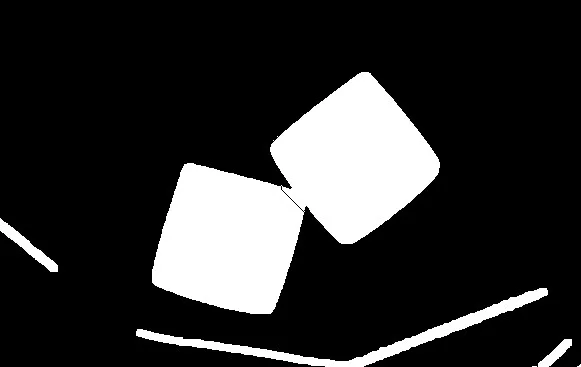
需要注意的是,`cv2.watershed()` 會原地修改 markers。若後續還要比較分割前後標記,應先複製一份 markers。
完整 OpenCV 範例怎麼寫?
完整流程可以用合成圖建立兩個重疊正方形,再依序做距離轉換、閾值、膨脹、未知區域、連通元件與 watershed。
```py
import cv2
import numpy as np
img = np.zeros((500, 500), dtype=np.uint8)
cv2.rectangle(img, (100, 100), (200, 200), 255, -1)
cv2.rectangle(img, (150, 150), (250, 250), 255, -1)
dt = cv2.distanceTransform(img, cv2.DIST_L2, 3)
dt = ((dt - dt.min()) / (dt.max() - dt.min()) * 255).astype(np.uint8)
ret, thresh = cv2.threshold(dt, 0.8 * dt.max(), 255, 0)
thresh = cv2.dilate(thresh, None, iterations=4)
unknown = cv2.subtract(img, thresh)
ret, markers = cv2.connectedComponents(thresh)
markers = markers + 1
markers[unknown == 255] = 0
markers = cv2.watershed(cv2.cvtColor(img, cv2.COLOR_GRAY2BGR), markers)
img[markers == -1] = 0
cv2.imshow("img", img)
cv2.waitKey(0)
cv2.destroyAllWindows()
```
常見問題
分水嶺演算法一定能拆開相黏物件嗎?
分水嶺演算法不一定能拆開所有相黏物件。若兩個物件的中心區域無法被 threshold 分開,watershed 的標記就會不準。
threshold 比例應該設多少?
threshold 比例要依物件形狀與接觸程度調整。我使用 `0.9 * dist_transform.max()`,但更一般的測試可從 0.7 到 0.9 之間嘗試。
connectedComponents 和 findContours 差在哪?
`connectedComponents()` 標記二值圖中的連通區域,適合建立 watershed markers。`findContours()` 找外部邊界,適合形狀分析與輪廓特徵計算。
watershed 的 `-1` 代表什麼?
watershed 結果中的 `-1` 通常代表分割邊界。我把 `markers == -1` 的像素設為 0,用來在結果圖中標出切割線。
參考資料
- OpenCV 文件,Image Segmentation with Watershed Algorithm,https://docs.opencv.org/4.x/d3/db4/tutorial_py_watershed.html,存取日期:2026-08-27。
- OpenCV 文件,Miscellaneous Image Transformations,https://docs.opencv.org/4.x/d7/d1b/groupimgprocmisc.html,存取日期:2026-08-27。
延伸閱讀
關於作者 {#author}
Claire Chang | 企業 AI 導入與流程轉型顧問。專注於 AI Agent 架構設計、ERP 系統整合與企業 AI 治理。
首次發布:2023-04-06