
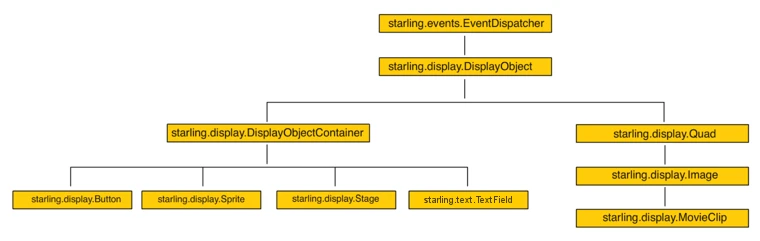
這是 Starling Display Objects 系列的第二篇,這次談 `starling.text.TextField`。它在 Starling 的顯示物件階層裡跟 `Button`、`Sprite`、`Stage` 一樣,都繼承自 `DisplayObjectContainer`,如下圖:
Starling TextField 怎麼用?
`TextField` 的建構子需要寬高、文字內容、字型名稱、字級與顏色,寫起來跟一般畫面元件差不多:
```actionscript
package {
import starling.display.Sprite;
import starling.events.Event;
import starling.text.TextField;
public class Game extends Sprite {
public function Game() {
addEventListener(Event.ADDED_TO_STAGE, onAdded);
}
private function onAdded (e:Event):void {
// create the TextField object
var legend:TextField = new TextField(300, 300, "簡單的文字範例", "Verdana", 38, 0xFFFFFF);
// centers the text on stage
legend.x = stage.stageWidth - legend.width >> 1;
legend.y = stage.stageHeight - legend.height >> 1;
// show it
addChild(legend);
}
}
}
```
這段跟一般 `TextField` 用法差不多,但真正要留意的是接下來的字型嵌入方式——這會直接影響到畫面效能。
內嵌字型跟 Bitmap Font,差在哪裡?
Starling 裡嵌入特殊字型有兩種做法,效能差異不小:
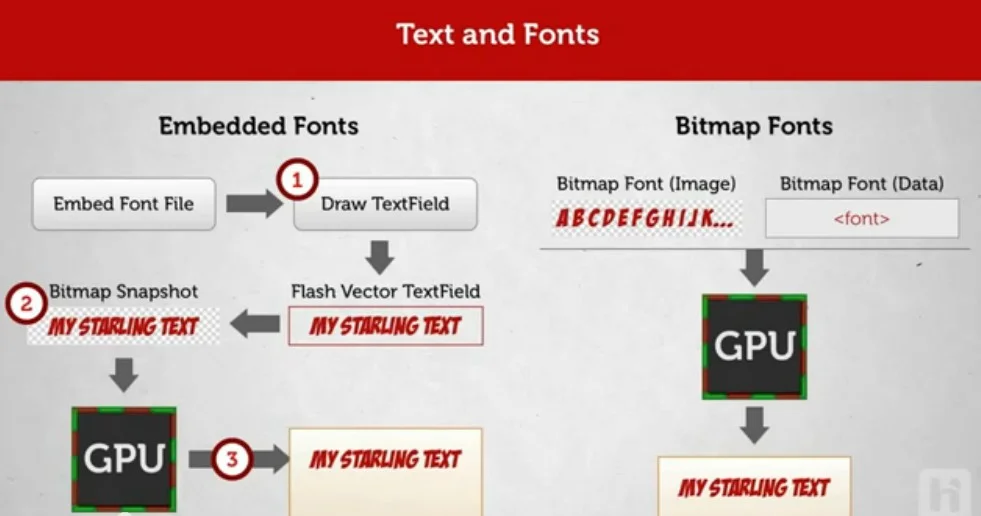
原始的字體嵌入方式,會先把 ttf 字型抽出來、即時壓成 Bitmap Snapshot,這一步要吃 CPU 運算。多了這道程序,效能自然比另一邊慢一些。Bitmap Font 則是拿一份字型圖檔(貼圖集)去對照 xml 字型資訊,全程只用 GPU 運算,效能會優於傳統字體嵌入。
但這兩種做法各有取捨:原始嵌入方式是即時轉出 Bitmap,各種尺寸都能維持清晰度;Bitmap Font 則得在產生字型圖檔時就先決定好要哪些字級,執行期沒辦法臨時改字級大小。換句話說,要換字級就得重新產生一份圖檔。
什麼時候該用 Bitmap Font?
如果畫面上的文字內容固定、字級固定(例如遊戲計分板、選單標籤),Bitmap Font 的效能優勢值得優先考慮。反過來,如果文字內容或字級會隨情境變動(例如使用者輸入、多語系動態排版),原始字體嵌入方式的彈性會比較好用。
常見的 Bitmap Font 產生工具有兩套:
- Glyph Designer(Mac 適用)
- BMFont(Windows 適用,官方頁面)
兩者都能設定要用哪些字元、字型與圖檔命名,產出的圖檔跟 `.fnt` 描述檔可以直接餵給 Starling。
兩種內嵌字型怎麼寫?
Standard TrueType Fonts
直接把 `.ttf` 用 `Embed` 嵌入 swf:
```actionscript
package {
import flash.text.Font;
import starling.display.Sprite;
import starling.events.Event;
import starling.text.TextField;
public class Game extends Sprite {
[Embed(source='/../media/fonts/Abduction.ttf', embedAsCFF='false', fontName='Abduction')]
public static var Abduction:Class;
public function Game() {
addEventListener(Event.ADDED_TO_STAGE, onAdded);
}
private function onAdded (e:Event):void {
// create the font
var font:Font = new Abduction();
// create the TextField object
var legend:TextField = new TextField(300, 300, "使用內嵌字型的簡單範例!", font.fontName, 38, 0xFFFFFF);
// centers the text on stage
legend.x = stage.stageWidth - legend.width >> 1;
legend.y = stage.stageHeight - legend.height >> 1;
// show it
addChild(legend);
}
}
}
```
Bitmap Fonts
先把貼圖跟 `.fnt` 描述檔嵌入,用 `TextField.registerBitmapFont` 註冊之後,把字型名稱丟給 `TextField` 就能用:
```actionscript
package
{
import flash.display.Bitmap;
import starling.display.Sprite;
import starling.events.Event;
import starling.text.BitmapFont;
import starling.text.TextField;
import starling.textures.Texture;
import starling.utils.Color;
public class Game extends Sprite {
[Embed(source = "../media/fonts/fontRegular.png")]
private static const BitmapChars:Class;
[Embed(source="../media/fonts/fontRegular.fnt", mimeType="application/octet-stream")]
private static const BritannicXML:Class;
public function Game() {
addEventListener(Event.ADDED_TO_STAGE, onAdded);
}
private function onAdded (e:Event):void {
// creates the embedded bitmap (spritesheet file)
var bitmap:Bitmap = new BitmapChars();
// creates a texture out of it
var texture:Texture = Texture.fromBitmap(bitmap);
// create the XML file describing the glyphes position on the spritesheet
var xml:XML = XML(new BritannicXML());
// register the bitmap font to make it available to TextField
TextField.registerBitmapFont(new BitmapFont(texture, xml));
// create the TextField object
var bmpFontTF:TextField = new TextField(400, 400, "使用內嵌字型的簡單範例!", "BritannicBold", 10);
// the native bitmap font size, no scaling
bmpFontTF.fontSize = BitmapFont.NATIVE_SIZE;
// use white to use the texture as it is (no tinting)
bmpFontTF.color = Color.WHITE;
// centers the text on stage
bmpFontTF.x = stage.stageWidth - bmpFontTF.width >> 1;
bmpFontTF.y = stage.stageHeight - bmpFontTF.height >> 1;
// show it
addChild(bmpFontTF);
}
}
}
```
`fontSize` 設成 `BitmapFont.NATIVE_SIZE` 代表用貼圖原始尺寸顯示,不做縮放;`color` 設白色則是讓貼圖本身的顏色原封不動顯示,不套色調。
常見問題
Starling TextField 一定要用 Bitmap Font 嗎?
不一定。文字內容和字級固定的場景(計分板、按鈕標籤)適合 Bitmap Font;文字內容或字級會動態變化的場景,原始字體嵌入方式比較彈性。
Bitmap Font 產生後還能改字級嗎?
不能臨時改。Bitmap Font 的字級在產生圖檔時就固定了,要換字級得重新產生一份新的圖檔和 `.fnt` 檔。
Glyph Designer 和 BMFont 該選哪個?
看作業系統:Mac 用 Glyph Designer,Windows 用 BMFont。兩者產出的圖檔加 `.fnt` 描述檔,格式都能給 Starling `registerBitmapFont` 使用。
參考資料
- The Starling Manual, Displaying Text:<http://wiki.starling-framework.org/manual/displaying_text>
- Starling Framework, TextField API:<http://doc.starling-framework.org/core/starling/text/TextField.html>
- Starting with Starling – Ep 10: Text and Fonts:<http://www.hsharma.com/tutorials/starting-with-starling-ep-10-text-and-fonts/>
延伸閱讀
關於作者 {#author}
Claire Chang | 企業 AI 導入與流程轉型顧問。專注於 AI Agent 架構設計、ERP 系統整合與企業 AI 治理。
首次發布:2014-02-07