
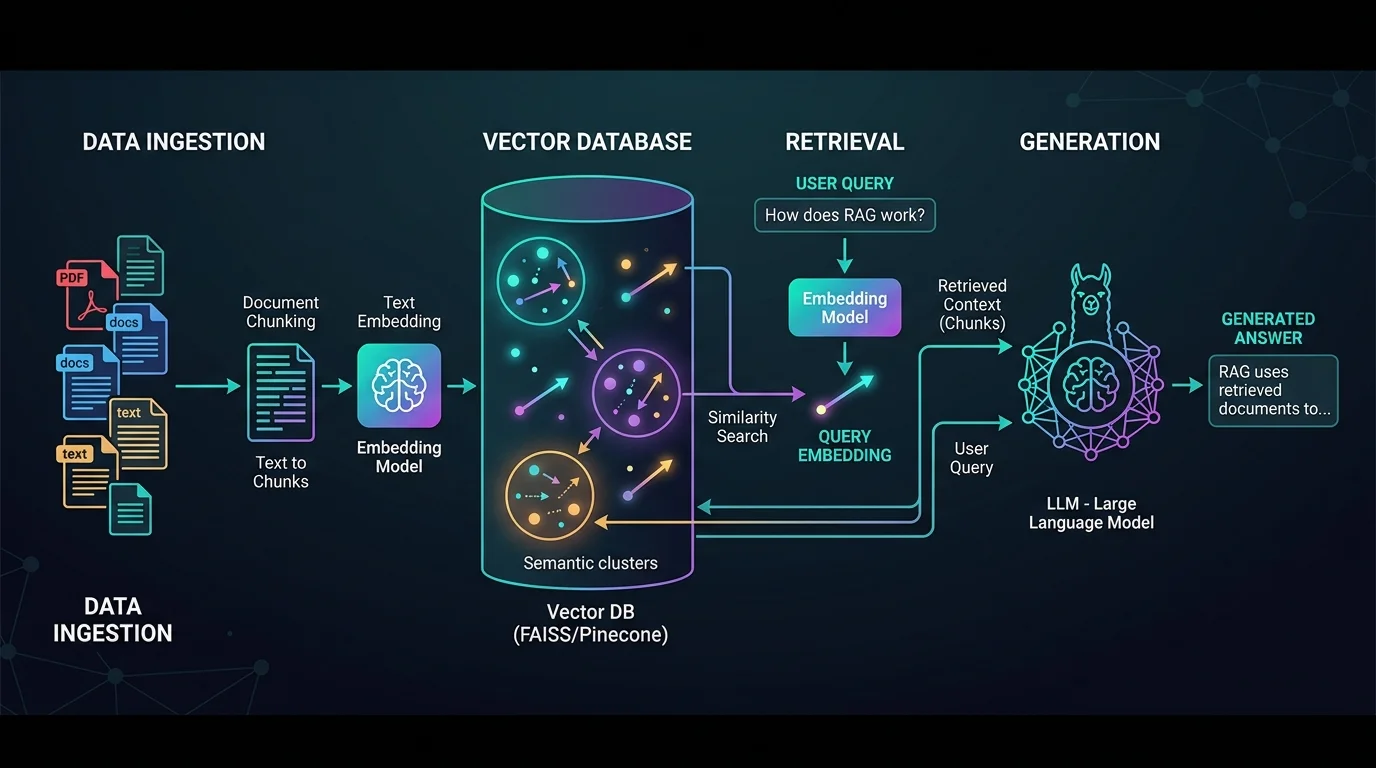
這篇文章解決「如何把各種資料來源餵進 LLM」的問題:我用 LlamaIndex 內建的 Loader 分別載入 YouTube 字幕、本地 PDF 和 Notion 筆記,把結果轉成統一的 Document 格式,最後建立向量索引做出一個可以對話問答的機器人。
怎麼用 LlamaIndex 載入 YouTube 影片的文字記錄?
用 YoutubeTranscriptReader 可以把 YouTube 影片的字幕(文字記錄)轉換為 Document 格式:
from llama_index.core import download_loader
# 載入環境變數
from dotenv import load_dotenv
load_dotenv()

YoutubeTranscriptReader = download_loader("YoutubeTranscriptReader")

loader = YoutubeTranscriptReader()
youtube_documents = loader.load_data(ytlinks=['https://www.youtube.com/watch?v=nHcbHdgVUJg&ab_channel=WintWealth'])
會得到如下格式的 JSON 資料:
[Document(id_='nHcbHdgVUJg', embedding=None, metadata={'video_id': 'nHcbHdgVUJg'}, excluded_embed_metadata_keys=[], excluded_llm_metadata_keys=[], relationships={}, text="I'm a Commerce graduate.......", start_char_idx=None, end_char_idx=None, text_template='{metadata_str}\n\n{content}', metadata_template='{key}: {value}', metadata_seperator='\n')]
每支影片會變成一個 Document,metadata 裡帶有 video_id,text 就是完整字幕內容。
怎麼讀取本地 PDF 文件?
使用下面的程式碼可以讀取本地端的 PDF 文件,請確保該檔案存在:
from pathlib import Path
from llama_index.core import download_loader

PDFReader = download_loader("PDFReader")

loader = PDFReader()

pdf_document = loader.load_data(file=Path('./sample.pdf'))
會產生如下的 JSON 檔案:
[Document(id_='c63920fc-1f19-4112-ab6a-d18aa193c037', embedding=None, metadata={'page_label': '1', 'file_name': 'sample.pdf'}, excluded_embed_metadata_keys=[], excluded_llm_metadata_keys=[], relationships={}, text=' \n \nLangChain 技术解密: \n构建大模型应用的全景指南 \n王浩帆 编著 \n', start_char_idx=None, end_char_idx=None, text_template='{metadata_str}\n\n{content}', metadata_template='{key}: {value}', metadata_seperator='\n'), ......]
PDFReader 預設會逐頁切分,每頁一個 Document,metadata 裡記錄頁碼(page_label)與檔名。
怎麼載入 Notion 筆記本?
只要準備 Notion integration token 和 database id,就能把整個資料庫的頁面讀進來:
from llama_index.core import download_loader
import os

NotionPageReader = download_loader('NotionPageReader')

integration_token = "your-notion-token"
database_id = "your-database-id"
reader = NotionPageReader(integration_token=integration_token)
notion_documents = reader.load_data(database_id=database_id)
怎麼把載入的文檔建成對話機器人?
把不同來源的 Document 合併後丟給 VectorStoreIndex,一行就能建立向量索引:
import os
from llama_index.core import VectorStoreIndex

all_documents = youtube_documents + pdf_document
index = VectorStoreIndex.from_documents(all_documents)
對話測試
接著把索引轉成 query engine,直接用自然語言提問:
query_engine = index.as_query_engine()
response = query_engine.query("介紹LangChain")
print(response)
LangChain 是一個基於大語言模型的應用程式開發框架,旨在簡化創建大模型應用程式的過程。它提供了一套完整的工具、組件和介面,使開發者能夠輕鬆地利用大語言模型的能力……可得到以上回應。
常見問題
LlamaIndex 的 download_loader 是什麼?
它會按需下載並回傳指定的資料載入器(Loader),例如 YoutubeTranscriptReader、PDFReader、NotionPageReader。每個 Loader 都把外部資料轉成 LlamaIndex 統一的 Document 格式,後續建立索引時不用再處理格式差異。
載入後的 Document 結構長什麼樣?
每個 Document 有 id_、text(實際內容)與 metadata(如 video_id、page_label、file_name)。還有 text_template 和 metadata_template 欄位,決定索引時如何把內容與 metadata 組合成文字。
PDF 會被切成多個文件嗎?
會。PDFReader 預設逐頁讀取,每一頁產生一個 Document,metadata 裡的 page_label 標示頁碼。這對之後做檢索時標記出處很方便。
載入多種來源後要怎麼一起查詢?
把各來源的 Document list 直接相加(如 youtube_documents + pdf_document),再丟給 VectorStoreIndex.from_documents() 建立單一索引,最後用 index.as_query_engine().query(...) 就能跨來源問答。
跑 NotionPageReader 前需要準備什麼?
需要一個 Notion integration token,以及要讀取的 database id。記得在 Notion 把該 integration 連結到目標資料庫,否則 API 會讀不到頁面。
參考資料
延伸閱讀
- LlamaIndex 載入多種類文件教學:PDF、YouTube 字幕與圖片 Reader 完整用法:同樣聚焦 LlamaIndex、RAG,可接著比較不同情境的做法。
- 使用LlamaIndex載入多種類文件:同樣聚焦 LlamaIndex、RAG,可接著比較不同情境的做法。
- LlamaIndex 介紹:用 Python 建立 RAG 索引與查詢流程:同樣聚焦 LlamaIndex、RAG,可接著比較不同情境的做法。
最後更新
2026-08-28(原文發布於 2024-05-17,本文保留原始筆記內容並補上 GEO 結構。)
關於作者
Claire Chang | 企業 AI 導入與流程轉型顧問。專注於 AI Agent 架構設計、ERP 系統整合與企業 AI 治理。
首次發布:2024-05-17